The infrastructure for your Pi subagents.

Bring your prompts, personas, and way of working. We provide the tools to launch sub-agents, send follow-ups, track progress, and collect results. You decide who does what and how much the parent coordinates.

Try for one Pi session:

pi -e npm:pi-subagentura

Pi coding agent ≥0.80.6 · Pi server ≥0.84.0 · Node ≥22.23.2
Interactive sessions require tmux, Zellij, or Herdr.

RECORDED PI SESSIONWEZTERM + TMUX
Pi parent and specialist terminals from the recorded tmux sessionWatch the session · 8:06
A real working session, with quiet stretches accelerated and English translations. Explore the full recording below.

The conversation keeps going.

For developers who already work in Pi and a terminal multiplexer, each specialist is another session you can enter and work in.

  1. Assign a focused task.

    Give the specialist a role and the context it needs. Reuse your persona instructions, choose a configured model, and launch a real child Pi session.

  2. Watch. Then join.

    Open /subagents or press Ctrl + Alt + A. Preview the terminal, focus its pane, or get an attach command to join from another terminal.

  3. Continue with that specialist.

    Ask about a finding or adjust the task in the same child context. Follow up directly or through the parent, then inspect the completed output.

v Preview terminalf Focus panea Show attach commandX Confirm subtree cancellation

Your prompts. Your level of delegation.

Keep the prompts and personas you have already built. Use the same infrastructure with your own instructions or our optional coordination prompt. With either approach, you can enter an interactive child's session.

DIRECT

Stay in charge of who does what.

Ask Pi for the specialists you need and choose their tasks, prompts, and models. Watch their progress and talk to them directly. Start with no orchestration flag, then add your own instructions below.

pi -e npm:pi-subagentura
OPTIONAL COORDINATOR

Let the parent coordinate more.

Try --orchestratorv2 for bundled guidance that routes clear work to attachable specialists and reuses them for follow-ups. The parent asks for clarification when scope is ambiguous or a narrow request has no matching specialist.

This is an optional system prompt. You can still join a specialist yourself.

Read the routing guide
pi -e npm:pi-subagentura --orchestratorv2

Bring your own sub-agent prompts.

For less autopilot, tell Pi how you want to delegate. Point it at your own folder of specialist prompts:

pi -e npm:pi-subagentura --append-system-prompt \
  "Ask me before delegating. Read the specialist prompts in ./agents and pass the chosen prompt as the child's persona."

Replace ./agents with your prompt folder. The parent reads the selected file and passes its instructions to the child; the folder is not automatically imported.

Already have coordination instructions in a file? Pi accepts a file path too:

pi -e npm:pi-subagentura --append-system-prompt ./team-instructions.md

After installing the extension, you can omit -e npm:pi-subagentura. These instructions guide the model; they do not enforce an approval gate.

Watch a full subagent workflow.

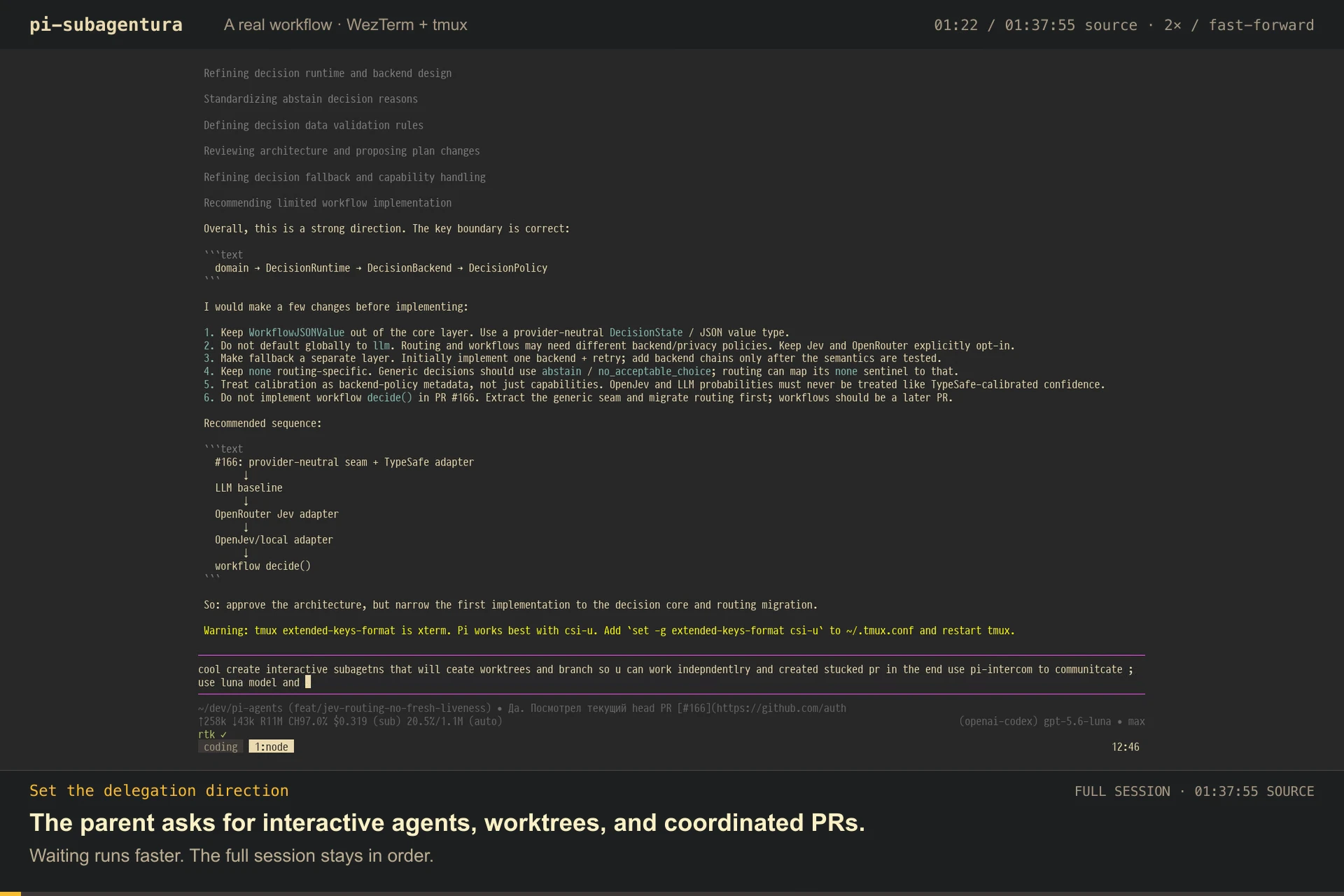
The complete 97:56 session plays as one chronological record, with quiet stretches accelerated up to 100×. The original terminal stays visible; English translations make the Russian status messages readable.

97:56 source session · 8:06 continuous edit · waits preserved at speedDownload the English transcript
Open the translated transcript
  1. Yes. I reviewed the current head of PR #166.

  2. I started two interactive subagents on Luna/max: an implementation worker in the separate worktree/branch feat/jev-routing-provider-neutral, and an architecture reviewer in feat/decision-plan-review. They communicate through pi-intercom; after the first commit I will continue with the upper layer and link the branches through gh stack.

  3. Understood. I will wait for the subagent notification, then verify the commit and create the stacked PRs.

  4. The second agent has written the tests; it only found missing node_modules in the new worktree. I’m waiting for the final commit before verifying both layers.

  5. The generic decision core is implemented and in final checks; I’m waiting for its SHA before verification and stacked PRs.

  6. The runtime agent exited after implementation but before commit. Its worktree, commit 72ca933, src/decision/* files, tests, and package allowlist survived; a new Luna/max agent continues verification and the provider-neutral branch is clean.

  7. Which agent exactly? The decision-runtime-core agent exited after implementation but before commit. Why was the tmux pane closed?

  8. The process exited 0 before completion while npm test was running; no stack trace or signal is recorded, and the worktree survived.

  9. The agent confirmed bounded diagnostics with backward compatibility and no decision-routing changes. The second agent continues hardening the generic core; both work independently.

  10. The bounded exit metadata design is good; I requested tests for signals, malformed data, parallel starts, and legacy support.

  11. The decision stack was created. Both PRs passed the full suite and required checks; diagnostics remains a separate fix PR.

  12. The second agent completed and committed 59f7091. PRs #168 and #169 are clean with green CI.

  13. I started a Luna/max agent to add the OpenRouter Decisions API adapter, shared codec, tests, and top PR in stack #170.

  14. The OpenRouter agent confirmed the shared codec approach and explicit configuration. Work continues in the top stacked branch.

  15. I’m waiting for the commit SHA, then I’ll verify it and add the branch as the top PR in stack #170.

  16. The mutation pilot passed on the OpenRouter branch; the only survivor is an unrelated existing baseline. PR #172 is clean with green CI and mutation results.

Read the handoffs and follow-ups.

These two real session replays show delegation, further direction, and collected reports. A specialist can also bring in its own bounded descendants.

Parent session

Follow the parent as it delegates work and sends a follow-up to an existing specialist.

Open parent replay
Preview the parent replay

Child session and its reviewers

See a child launch recovery-safety and package/API reviewers, redirect them, and collect their findings.

Open child replay
Preview the child replay

Replays generated with vibe-replay.

Find the right fit for your Pi setup.

Visibility, follow-ups, and persistence appear across several tools. Choose the interaction and coordination style that fits your work.

Pi subagents comparison

Docs checked · scroll table on small screens
Pi subagents comparison: documented strengths and tradeoffs
Tool / sourceChoose it forConsider the tradeoff
pi-subagenturaThis projectContinue with specialists in real Pi terminals. Choose interactive sessions or lightweight in-process delegation.Interactive sessions need tmux, Zellij, or Herdr. Recovery follows the matching parent session; in-process jobs and background workflows end with their parent session.
pi-interactive-subagentsAttachable Pi sessions with cmux, tmux, Zellij, or WezTerm support, custom agents, interruption, and resume.A close alternative for terminal interaction. Choose based on your multiplexer and preferred coordination tools; attachment and continuation are shared capabilities.
pi-subagents · nicobailonA broad Pi orchestration toolkit with agent definitions, chains, worktrees, artifacts, and FleetView controls.The interaction stays in Pi's fleet interface. A strong fit when you want built-in orchestration without managing child terminal panes.
@tintinweb/pi-subagentsFleetView, live transcripts, inline steering, reusable agent definitions, nested delegation, and scripted workflows inside Pi.Control happens in widgets and conversation overlays; no attachable child terminal is documented. Memory, tool restrictions, and worktree options offer more configuration choices.
@mjakl/pi-subagentA small process-based tool with Markdown agents, parallel calls, fresh or parent-seeded context, and reusable named conversations.Headless children report through the parent UI. Named sessions require a persisted parent and stay scoped to it; no worktree feature is documented.

Each tool links to its published documentation. This is a guide to fit, not a performance or reliability benchmark.

Adjacent team coordination: pi-messenger connects multiple Pi sessions through presence, messages, file reservations, and task coordination. Consider it when independently running agents need a shared workspace.

Start with one real task.

Use @earendil-works/pi-coding-agent ≥0.80.6, @earendil-works/pi-server ≥0.84.0, and Node ≥22.23.2. Have tmux or Zellij installed, or run Pi inside a Herdr pane for Herdr support. Model usage follows your configured provider.

Try for one session.

Load the extension without adding it to your Pi settings.

pi -e npm:pi-subagentura

Published package: v4.0.1 · verified .

Read the source

Then give Pi a task like this.

Start two interactive specialists in visible panes, using background: false. Have one review the API contract and the other check database behavior and tests. Keep both reviews read-only, return findings with file references, and keep the sessions available for follow-ups.

Open /subagents, choose a specialist, and press f to enter its pane. Ask it a follow-up about a finding.

GLOBAL

Keep it in Pi.

Install for your future sessions.

PROJECT

Keep it in this project.

Install only for the current workspace.

Context, continuity, and advanced tools

Interactive specialists can start independently, inherit the parent conversation, or receive an explicit handoff. Reusing persona instructions does not automatically import another tool's agent configuration.

Standalone interactive children and their saved outputs can survive parent reloads and a restart into the same parent session. A fresh /new or /fork cleans up owned panes. In-process jobs and background workflows end with their parent session, including reload, resume, or quit.

Separate child processes do not create separate git worktrees automatically. Choose working directories and worktrees to suit your task.

Direct tools also support in-process delegation. For saved, trusted JavaScript workflows, see the workflow guide and its --orchestrator mode. Workflow execution is not a security sandbox.

Anonymous product telemetry is enabled by default. Start with --no-subagentura-telemetry to opt out, or read the telemetry details.